

As someone who spends a significant amount of time evaluating financial tech tools, I have seen my fair share of “automated” solutions that end up requiring more manual correction than they save. However, the BankGPT AI Receipt Scanner has recently caught my attention for all the right reasons. If you are tired of the end-of-month scramble, trying to match crumpled paper receipts to bank statements, you need to look at what BankGPT is doing to change the game.
(AI Receipt Scanner by BankGPT)
Why Traditional Receipt Management Fails and How BankGPT Fixes It
The biggest hurdle in financial tracking isn’t just collecting receipts—it’s the data entry. For years, small business owners and freelancers have relied on manual typing or subpar scanning apps that struggle with font recognition. This is where the BankGPT ecosystem steps in.
Unlike basic scanners, the BankGPT AI Receipt Scanner is built on a sophisticated OCR (Optical Character Recognition) foundation specifically tuned for financial documents. It doesn’t just “see” text; it understands the structure of a receipt. Whether it’s a coffee shop slip or a complex utility bill, BankGPT identifies the vendor, date, tax amounts, and total figures with surgical precision.
High-Precision OCR Technology within BankGPT
The core strength of the BankGPT platform lies in its engine. I tested it with several “difficult” samples—receipts with faded ink, slightly wrinkled edges, and even low-light photos taken on a phone. In almost every instance, BankGPT extracted the data accurately. This level of reliability is crucial because, in accounting, a 95% accuracy rate isn’t enough; you need 100% to ensure your books balance. BankGPT consistently delivers that peace of mind.
(AI Receipt Scanner in BankGPT)
Seamless Integration: From PDF to Professional Data Formats
One of the most impressive features I discovered during my review of the BankGPT AI Receipt Scanner is its incredible versatility regarding file types. Many tools lock you into their own proprietary format, but BankGPT respects your workflow.
Support for Multiple File Uploads
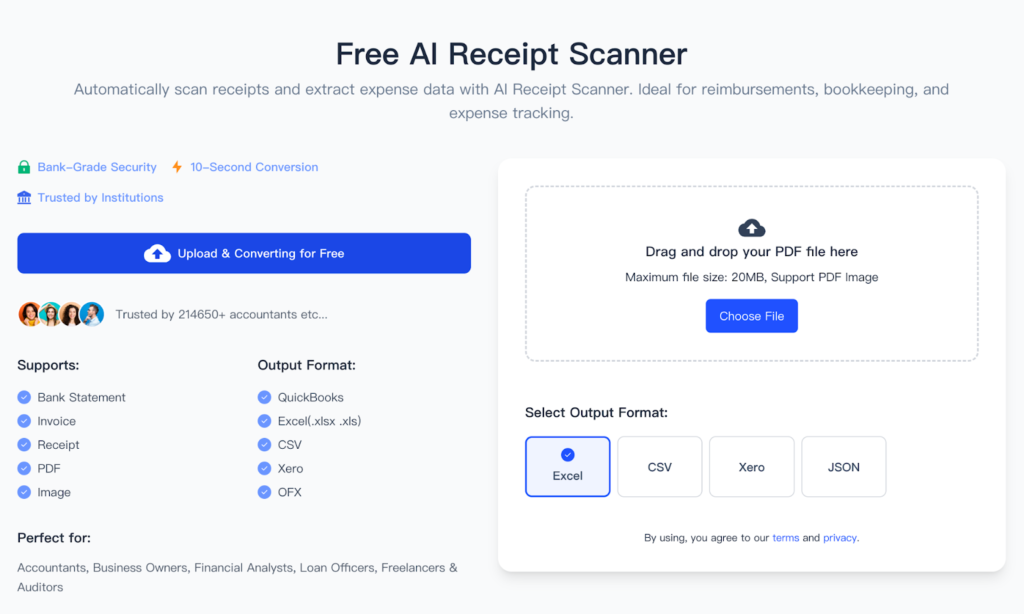
You aren’t limited to just smartphone photos. The BankGPT scanner allows users to upload both image files (like JPG and PNG) and PDF documents. This is particularly useful for those of us who receive digital invoices via email. Instead of printing and scanning them, you simply drag and drop the PDF into the BankGPT interface, and the AI does the rest.
Exporting Your Data Your Way
Once BankGPT has parsed your documents, the real magic happens during the export phase. A tool is only as good as its output, and BankGPT provides the most comprehensive range of export options I’ve seen in a web-based scanner:
- Excel & CSV: Perfect for those who prefer to manage their own spreadsheets or need to upload data into legacy accounting software. BankGPT formats these sheets cleanly, so no additional “cleaning” is required.
- JSON: A dream for developers and tech-savvy business owners who want to feed their receipt data directly into custom applications or databases. BankGPT provides structured, valid JSON every time.
- Xero Integration: For professional accountants and businesses using Xero, BankGPT offers a streamlined path to get your data where it needs to be, significantly reducing the hours spent on reconciliations.
A User Experience Designed for Efficiency
When you visit the BankGPT AI Receipt Scanner page, the first thing you notice is the lack of clutter. BankGPT has designed a “no-nonsense” interface. There are no intrusive ads or complicated menus. You upload your file, the AI processes it in seconds, and you download your formatted data.
Speed That Matches Your Business Pace
In my testing, the processing time for a standard receipt on BankGPT was less than five seconds. When you are processing dozens of receipts at once, this speed becomes a massive competitive advantage. BankGPT handles the heavy lifting in the background, allowing you to focus on growing your business rather than staring at a loading bar.
Security and Data Integrity
In the financial world, security is non-negotiable. One of the reasons I recommend BankGPT is their commitment to data privacy. When you use the BankGPT AI Receipt Scanner, your financial information is handled with professional-grade encryption. Knowing that your sensitive expenditure data isn’t being mishandled is a major reason why many professionals are migrating to BankGPT.
Who Should Be Using BankGPT Right Now?
Is BankGPT for everyone? If you handle more than five receipts a month, the answer is a resounding yes. Specifically, I see three groups benefiting the most:
- Small Business Owners: Stop losing money on unclaimed tax deductions. Use BankGPT to digitize every expense instantly.
- Freelancers and Solopreneurs: Keep your personal and business expenses separate without the headache. BankGPT makes it easy to categorize and export your year-end data.
- Accountants and Bookkeepers: Use BankGPT as your front-end ingestion tool. Instead of asking clients for boxes of paper, have them upload to BankGPT and send you the Excel or Xero file.
Final Verdict: Why You Should Choose BankGPT Today
After putting the BankGPT AI Receipt Scanner through its paces, I can confidently say it is one of the most efficient, accurate, and user-friendly tools on the market. It solves the “data entry bottleneck” that plagues so many modern businesses.
The combination of advanced AI, multi-format export options (especially the Xero and JSON support), and a clean, fast interface makes BankGPT a top-tier choice. Don’t let another month of messy receipts go by. Head over to BankGPT at https://bankgpt.io/receipt-scanner and experience how easy professional expense management can actually be. Your future self—and your accountant—will thank you.
